

Limits at a glance
How often an agent can run
Each agent can make up to 100 live runs per day. The count resets at midnight in your company’s timezone. Scheduled runs, webhook-triggered runs, and Run now actions on a live agent count toward this limit. Queued and running runs also count. Test runs and failed runs do not count. When an agent reaches the daily limit, additional runs are refused until the count resets. The run history displays the following message:This agent has reached its limit of 100 runs for today. It resets at midnight.
Webhook requests that exceed the limit receive a 429 response.
Stay within the daily limit
Most scheduled agents stay within the daily limit. For example, an agent that runs hourly would run 24 times a day. Webhook agents are more likely to reach the limit when another system sends a separate request for every record. If the calling system supports it, send a single request containing a batch of records instead.Set a monthly run limit
You can set a monthly cap to control how many live runs an agent makes. The cap is off by default. Only users who can edit the agent can change it. To set a monthly cap:- Open the agent under My agents.
- Go to Access & Usage.
- Turn on Run Limit.
- Under Stop after … runs a month, select a number or enter a custom limit.
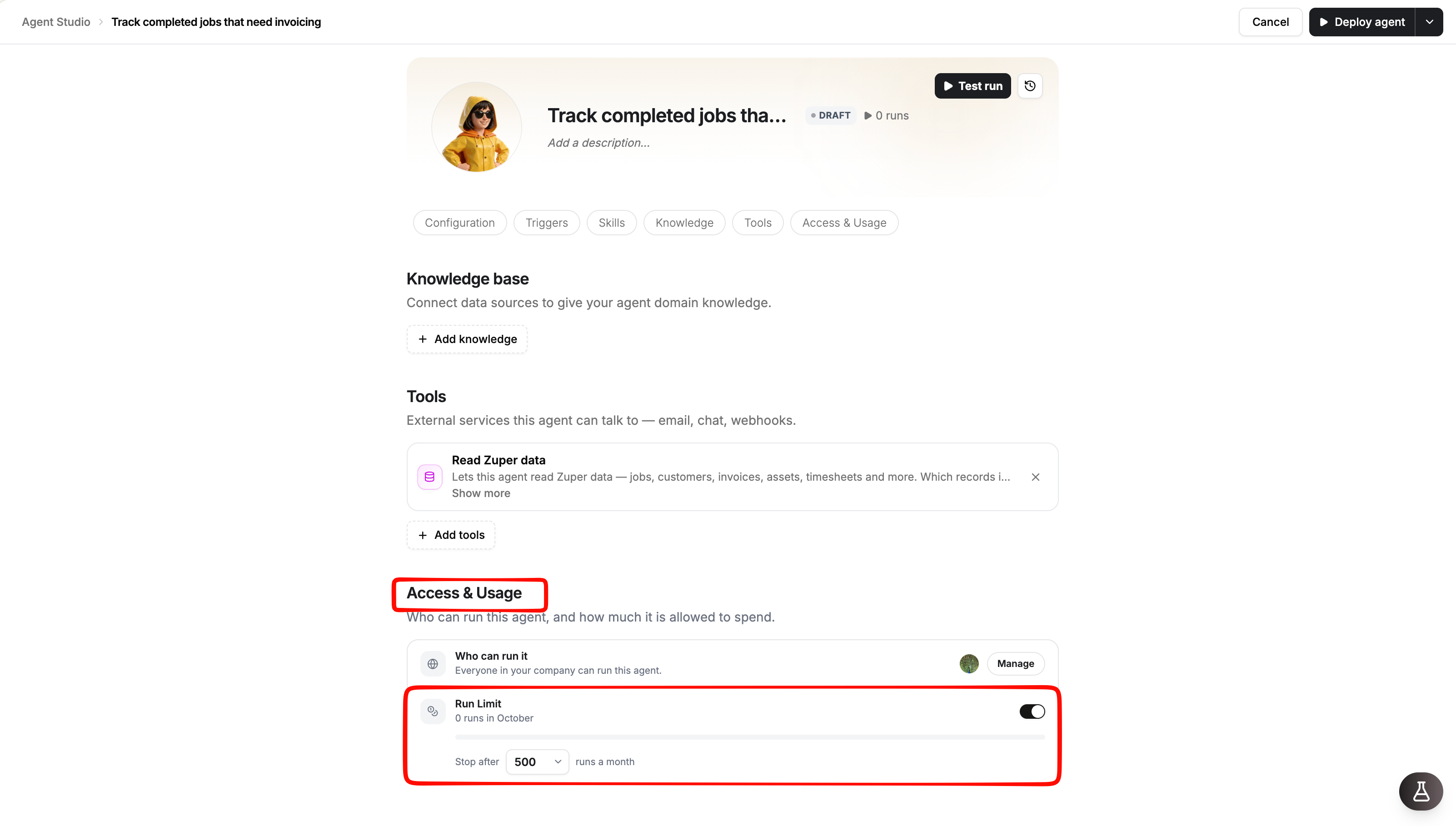
- Select Deploy agent to save the change.
How much data one run can process
An agent can process up to 1,000 records in a single step. When more records match a query, the agent works with a limited set of records rather than processing the entire result set. For example, if 4,517 records match a query, the agent might report that it processed 1,000 of the 4,517 matching records. The distinction between counts and record-level results is important:- Counts: The agent can return the total number of matching records when Zuper provides that total, even if it exceeds 1,000.
- Lists, summaries, and calculations: These cover only the records the agent actually processed. Counts and sums calculated from those records may not represent the entire result set.
- Additional steps: The 1,000-record limit applies to each step. A step that would exceed the limit, such as a lookup performed once for every record, can be refused. Splitting the work into smaller pages does not bypass this limit.
Keep data processing within the limit
- Use specific filters. Ask for overdue invoices from the last 90 days instead of all overdue invoices.
- Limit the results. Ask for the 20 largest overdue invoices rather than a complete list.
- Narrow the scope. Separate work by team, territory, or status when appropriate.
- Request a count when a list is unnecessary. A count can use Zuper’s reported total without requiring the agent to process every matching record.
1,000 of 4,517 indicates that the agent processed only part of the matching data. Refine the instructions before deploying the agent if you need complete record-level results.
How much work one run can do
An agent can take up to 60 steps per run. Each tool call or reasoning step contributes to this limit. When the agent reaches the limit, it stops and returns an answer based on the work completed so far. Agents are more likely to reach this limit when they handle several unrelated tasks in one run. To reduce unnecessary steps:- Give each agent one clearly defined responsibility.
- Specify the data it needs and the result it should produce.
- Avoid combining unrelated reporting, analysis, and record-update tasks in one agent.
- Use focused filters to reduce the amount of data the agent needs to process.
Webhook limits and behavior
Webhook-triggered agents have request-size, rate, and timestamp requirements.
A request that exceeds a rate limit receives a
429 response with a Retry-After header indicating how many seconds to wait. Configure the calling system to retry after that interval.
Keep these additional requirements in mind:
- Every accepted webhook request starts a run and counts toward the agent’s daily run limit.
- The webhook accepts requests only when its trigger is enabled and the agent is Active.
- The signing secret is displayed only once. If you lose it, regenerate it; the previous secret stops working immediately.
- Use the Webhook Signing Policy article for response codes and request-signing requirements.
Knowledge limits and supported sources
Custom agents can use knowledge bases to access information relevant to their tasks.
When you add a website as a knowledge source, Zuper reads up to 50 pages. A bare domain reads the site, while a URL containing a path reads pages under that path.
Keep each knowledge base focused on one subject. Short, specific documents make it easier for the agent to find relevant information than long, general manuals.
Schedule agents responsibly
- A scheduled agent runs at the configured time in the timezone displayed in its schedule settings.
- Advanced cron expression accepts a standard five-part cron expression: minute, hour, day of month, month, and day of week. Expressions containing seconds or years are not supported.
- Weekly schedules run on Mondays, and Monthly schedules run on the first day of the month. To use another day, configure an Advanced cron expression.
- There is no fixed minimum interval between runs. However, each live run counts toward the daily limit, reads data, and may send emails or chat messages. Choose a frequency that matches the value of the result, such as a daily digest instead of an hourly report when hourly updates are unnecessary.
- An agent without a trigger runs only when you select Run now.
- When you duplicate an agent, its schedule is disabled by default, and its webhook is not copied.
Write to Zuper data carefully
The Write Zuper data tool creates and updates live records. Test runs do not apply these changes; proposed changes are marked held back. Before deploying an agent that writes to Zuper:- Start with a narrow filter so the agent works on a limited set of records.
- Review its initial results in the run history and verify the affected records in Zuper.
- Expand the scope only after confirming that the agent selects and updates the correct records.
- Grant Write Zuper data only when modifying records is part of the agent’s intended task. Agents that only report information should use Read Zuper data.
- Check webhook payloads carefully before enabling write operations on webhook-triggered agents. Each accepted request can initiate a run that changes records.
Improve agent accuracy
Agents use AI to interpret instructions and determine which actions to take. Clear, specific instructions help reduce ambiguity and improve results.- Verify results before relying on them. Compare a new agent’s output with the corresponding data in Zuper.
- Use exact field names and statuses. Match the names and values used in your account.
- Specify date ranges clearly. Define terms such as yesterday, last 7 days, or this month when they affect the result.
- Provide business rules in Knowledge. Add your company’s definitions, terminology, and procedures so the agent does not have to infer them.
- Review early runs. Check the run history during the first few days and refine the instructions when the results are incomplete or inaccurate.