> ## Documentation Index
> Fetch the complete documentation index at: https://docs.zuper.co/llms.txt
> Use this file to discover all available pages before exploring further.
# Radar overview
> What Radar is in Zuper Sense, what a card is, and how Radars stay live.
Radar is your central dashboard for tracking recurring metrics and KPIs. Instead of querying Zuper Sense repeatedly every morning, pin key insights to a Radar card to keep live, real-time metrics continuously visible to you and your team.
**Navigation**: *Sense -> Radar*
 ## Understanding cards
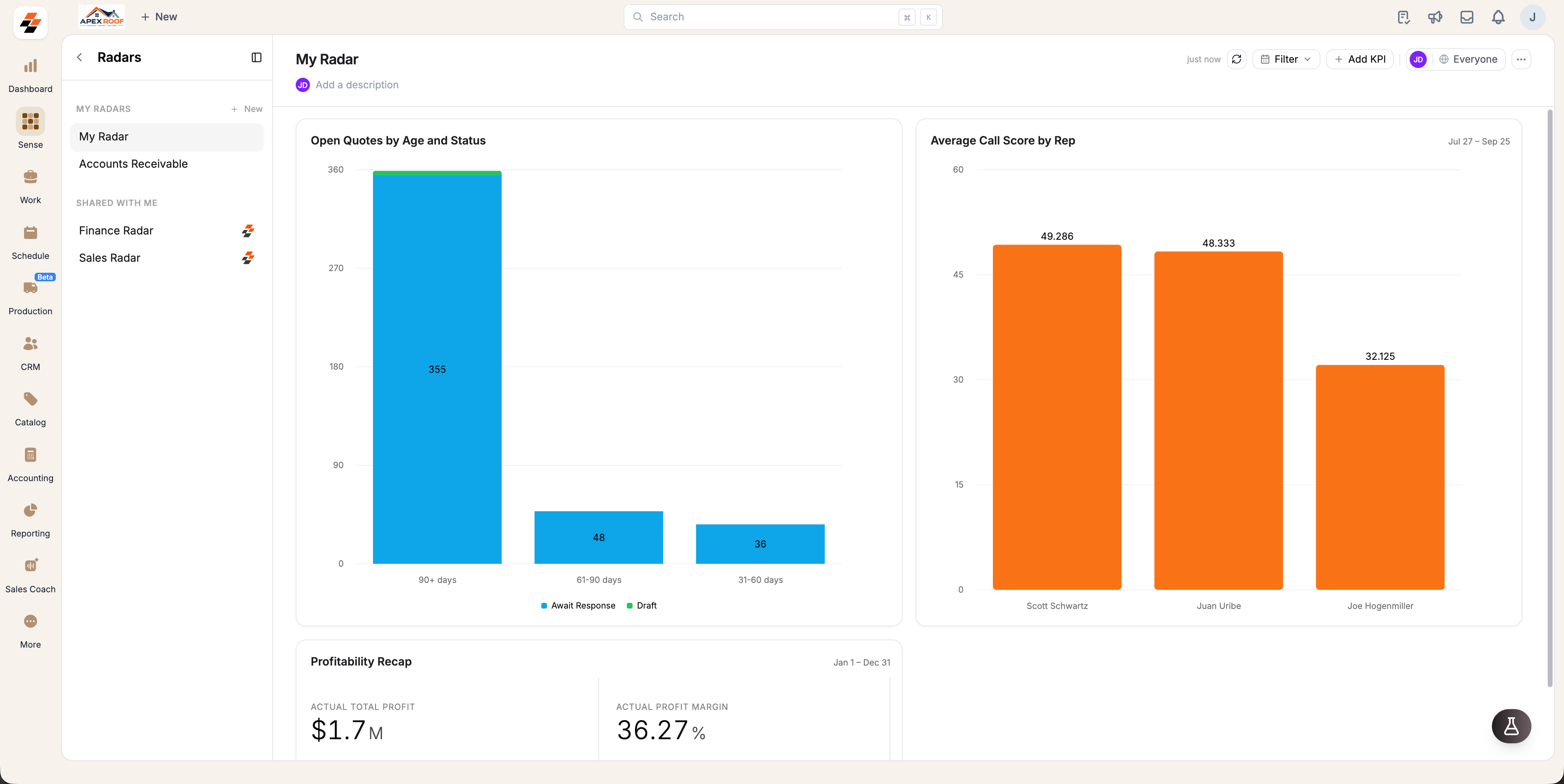
A **card** represents a single KPI pinned to a Radar. Cards automatically retain the visual format of the original pinned answer, appearing as a single metric, a bar or line chart, or a summary table.
* Cards continuously query your Zuper data to display up-to-date metrics.
* Click **Refresh** in the top toolbar to fetch updated figures across all cards simultaneously.
* Select **Filter** to adjust the active date range across supported cards on the board.
**Note:** A single Radar can host up to 50 cards, and your account can maintain up to 20 individual Radars.
## Default Radars
Sense comes pre-configured with three ready-to-use Radars:
* **My Radar**: Your private dashboard located under **MY RADARS**.
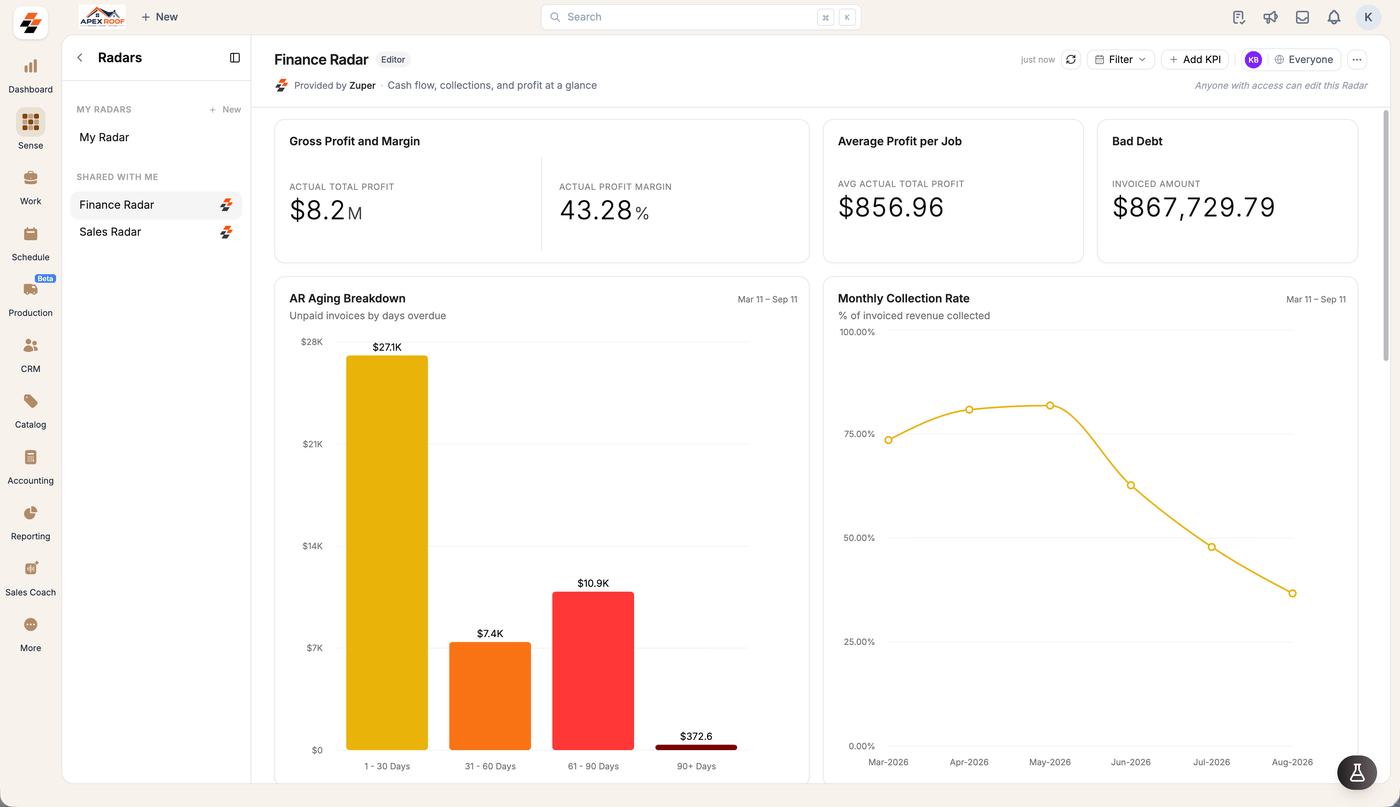
* **Sales Radar**: A pre-built sales dashboard provided under **SHARED WITH ME**.
* **Finance Radar**: A pre-built finance dashboard provided under **SHARED WITH ME**.
Default Zuper boards display a **Provided by Zuper** tag. Administrators can edit these dashboards, while users with shared access can view them.
## Understanding cards
A **card** represents a single KPI pinned to a Radar. Cards automatically retain the visual format of the original pinned answer, appearing as a single metric, a bar or line chart, or a summary table.
* Cards continuously query your Zuper data to display up-to-date metrics.
* Click **Refresh** in the top toolbar to fetch updated figures across all cards simultaneously.
* Select **Filter** to adjust the active date range across supported cards on the board.
**Note:** A single Radar can host up to 50 cards, and your account can maintain up to 20 individual Radars.
## Default Radars
Sense comes pre-configured with three ready-to-use Radars:
* **My Radar**: Your private dashboard located under **MY RADARS**.
* **Sales Radar**: A pre-built sales dashboard provided under **SHARED WITH ME**.
* **Finance Radar**: A pre-built finance dashboard provided under **SHARED WITH ME**.
Default Zuper boards display a **Provided by Zuper** tag. Administrators can edit these dashboards, while users with shared access can view them.
 ## Permissions & access controls
Creating, editing, sharing and deleting Radars is limited to admins as of now.
A role badge next to the Radar name tells you where you stand on that board: **Editor** means you can add and arrange cards, **View only** means you can read it.
## Related topics
* [**Setup Radars**](/Zuper_Sense/Radar/Setup_Radars): Learn how to create Radars, add or arrange cards, and drill into specific metrics.
* [**Sharing**](/Zuper_Sense/Radar/Sharing): Configure access permissions and share dashboards across your team.
## Permissions & access controls
Creating, editing, sharing and deleting Radars is limited to admins as of now.
A role badge next to the Radar name tells you where you stand on that board: **Editor** means you can add and arrange cards, **View only** means you can read it.
## Related topics
* [**Setup Radars**](/Zuper_Sense/Radar/Setup_Radars): Learn how to create Radars, add or arrange cards, and drill into specific metrics.
* [**Sharing**](/Zuper_Sense/Radar/Sharing): Configure access permissions and share dashboards across your team.