> ## Documentation Index
> Fetch the complete documentation index at: https://docs.zuper.co/llms.txt
> Use this file to discover all available pages before exploring further.
# Personalization
> Tell Zuper Sense how you want answers written, so you stop repeating yourself.
Set default preferences for Zuper Sense so answers are tailored to your role and formatting needs without repeating instructions in every prompt. Sense applies your saved preferences across all threads on your account.
**Navigation**: *Sense -> Personalization*
## Open Personalization
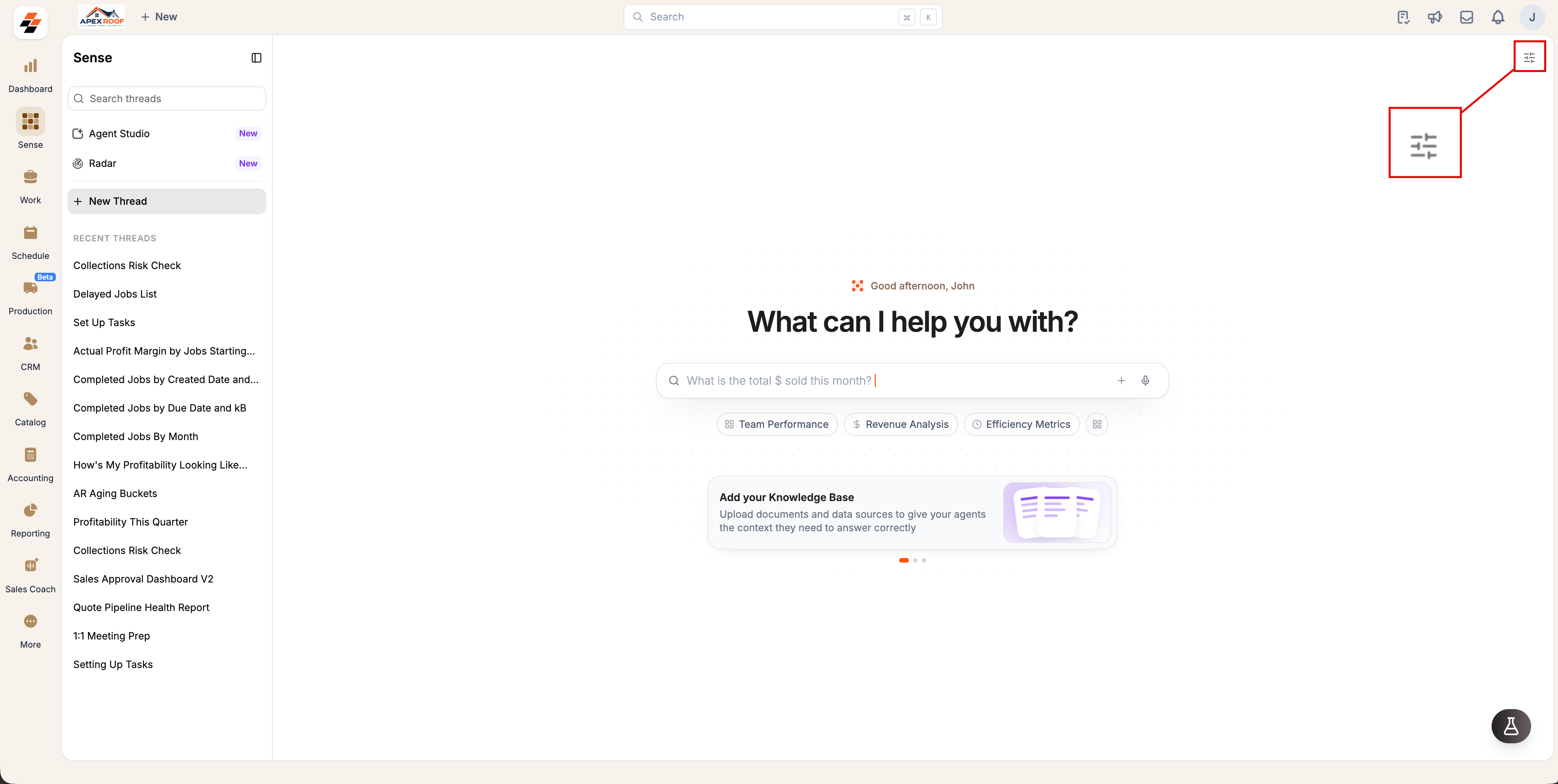
1. Open **Sense** from the left navigation.
2. Select the **Settings** icon in the top-right corner.
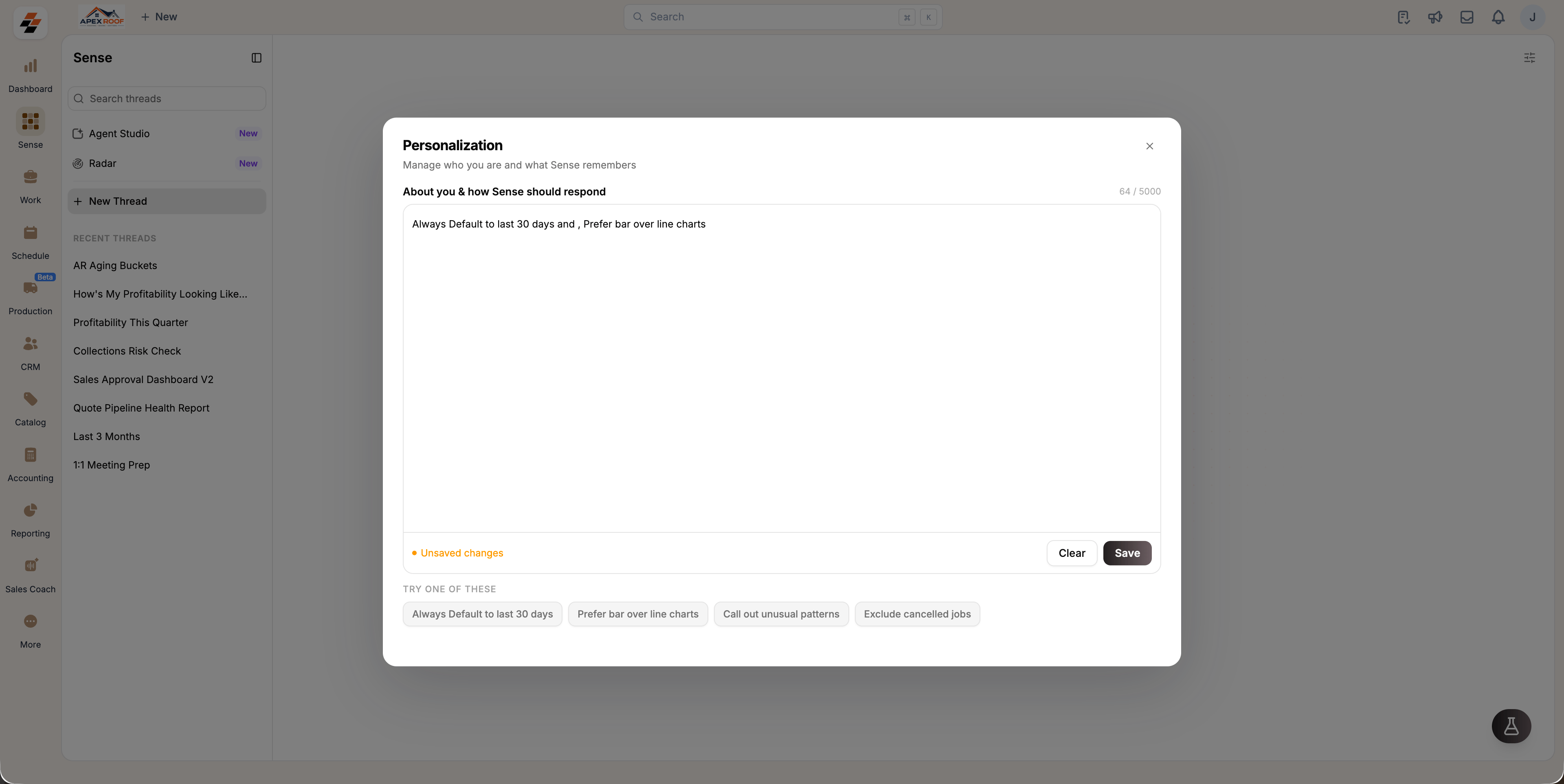
3. The **Personalization** dialog box opens.
 ## Save your preferences
1. Enter your preferences into the **About you & how Sense should respond** text box, one per line or as a sentence.
2. (optional) Select any chip under **TRY ONE OF THESE** to insert standard preference templates instantly.
3. Select **Save**.
**Examples of common preferences:**
* *Always default metrics to the last 30 days.*
* *Prefer bar charts over line charts for comparisons.*
* *Exclude cancelled or refunded jobs from summaries.*
* *Highlight unusual spikes or patterns in financial metrics.*
**Note:** Preferences apply exclusively to your account (they will not alter results for your teammates). The text box supports up to 5,000 characters.
## Edit or clear your preferences
To update or remove your custom instructions:
* **To edit:** Reopen **Personalization**, modify your instructions, and select **Save**.
* **To delete everything:** Select **Clear**, then confirm.
Selecting **Clear** permanently removes all saved preferences and resets Sense to its default account behavior. This action cannot be undone.
## How Personalization works
While Personalization gives you direct control over standard behaviors, Sense also learns context dynamically from your past threads, such as frequent scopes and output formatting preferences.
Keep your preferences short and direct. Concise instructions (e.g., *"Exclude cancelled jobs"*) produce more reliable results than complex, lengthy paragraphs.
## Save your preferences
1. Enter your preferences into the **About you & how Sense should respond** text box, one per line or as a sentence.
2. (optional) Select any chip under **TRY ONE OF THESE** to insert standard preference templates instantly.
3. Select **Save**.
**Examples of common preferences:**
* *Always default metrics to the last 30 days.*
* *Prefer bar charts over line charts for comparisons.*
* *Exclude cancelled or refunded jobs from summaries.*
* *Highlight unusual spikes or patterns in financial metrics.*
**Note:** Preferences apply exclusively to your account (they will not alter results for your teammates). The text box supports up to 5,000 characters.
## Edit or clear your preferences
To update or remove your custom instructions:
* **To edit:** Reopen **Personalization**, modify your instructions, and select **Save**.
* **To delete everything:** Select **Clear**, then confirm.
Selecting **Clear** permanently removes all saved preferences and resets Sense to its default account behavior. This action cannot be undone.
## How Personalization works
While Personalization gives you direct control over standard behaviors, Sense also learns context dynamically from your past threads, such as frequent scopes and output formatting preferences.
Keep your preferences short and direct. Concise instructions (e.g., *"Exclude cancelled jobs"*) produce more reliable results than complex, lengthy paragraphs.