> ## Documentation Index
> Fetch the complete documentation index at: https://docs.zuper.co/llms.txt
> Use this file to discover all available pages before exploring further.
# Agent anatomy
> The parts every Zuper Sense agent has, what each one does, and how they work together.
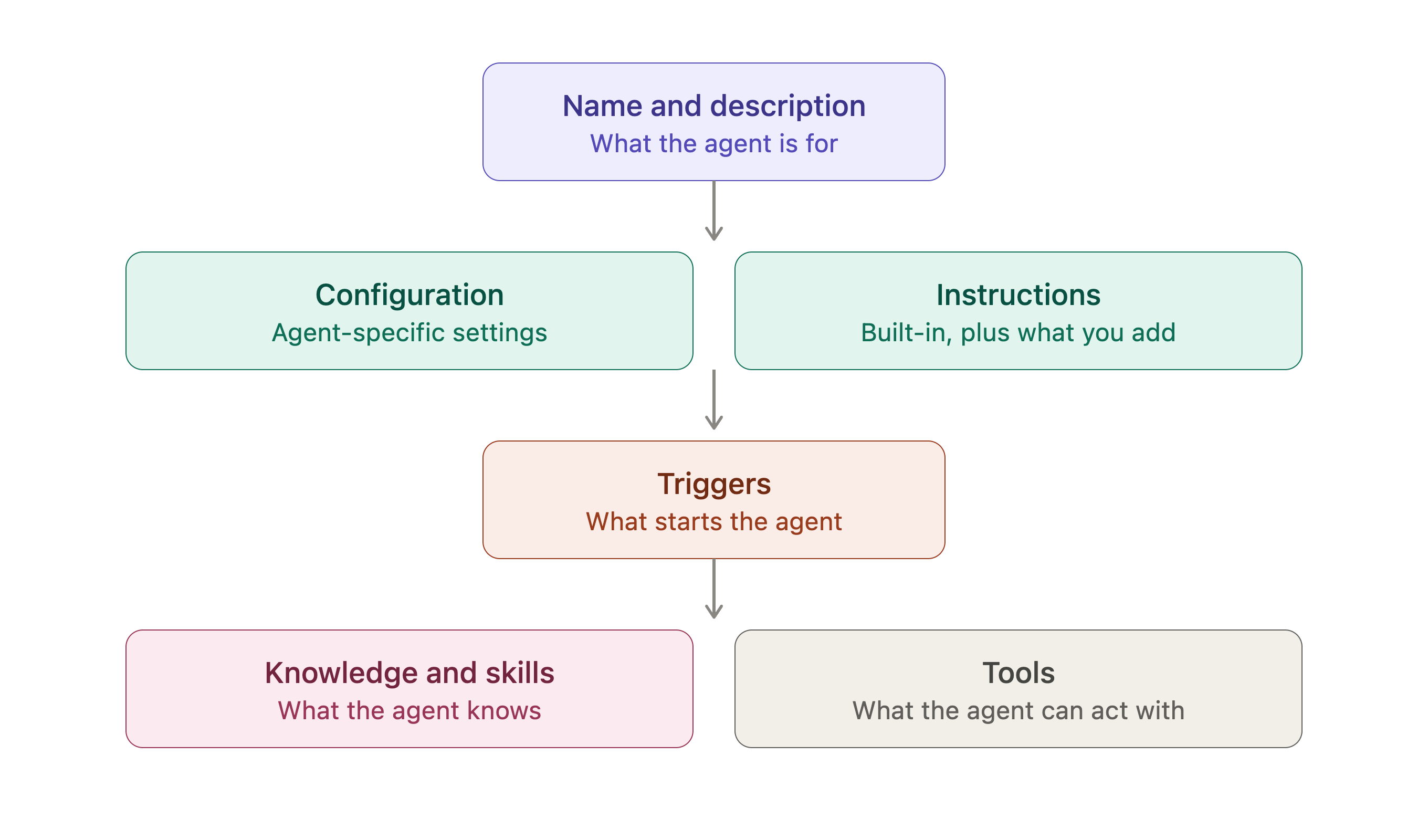
Every agent in Zuper Sense is constructed using a standard set of structural components. Understanding how these components function helps you quickly identify where to adjust settings and customize agent behavior.
**Navigation**: *Sense -> Agent Studio -> My agents*
 ## Name and description
The name and description say what the agent is for. They are what you and your colleagues see on the **My agents** card and at the top of the agent's page. Write descriptions clearly so team members can easily identify which agent suits their operational needs.
## Configuration and instructions
**Configuration** holds the settings specific to that agent, the cities a Weather Agent forecasts and the Google listing a Reputation Agent monitors. Required fields are marked with an asterisk (\*) and must be completed before deployment.
**Custom Instructions** sits in the same section and holds two things:
* The instructions Zuper sets, which describe the agent's job step by step and reference the tools it uses.
* Whatever you add, which tailors the output, tone, what to emphasise, and thresholds that matter to your business.
**Note**: Custom instructions are optional. Marketplace agents function out of the box once all required configuration fields are completed.
## Triggers
A trigger is what starts the agent. Most Marketplace agents ship with a **Scheduled** trigger: pick **Every hour**, **Every day**, **Every week**, **Every month**, **Weekdays** or **Custom**, set the time, and the agent runs on that cadence in the timezone shown. **Run now** runs the agent once, on demand, without touching the schedule; it is available once the agent is **Active**.
## Knowledge and Skills
**Knowledge** is the set of [**Knowledge Base**](/Zuper_Sense/Agent_Studio/Knowledge_Base) entries the agent reads before it answers; your terminology, policies and calculation rules. Add entries with **Add knowledge** and remove them with **Remove**.
[**Skills**](/Zuper_Sense/Agent_Studio/Skills) are reusable instructions for a repeatable task that you hand to an agent instead of retyping them.
## Tools
Tools are what the agent can act with. **Get Weather** fetches a forecast, **Fetch Google Reviews** pulls new reviews, **Send Email** sends the digest, and **Send Message (Chat)** posts to a Zuper Chat channel. A tool that still needs setting up is flagged **(needs setup)** in the instructions, and **Configure** on the tool row is where you finish it.
Removing a tool takes away the ability it depends on. An agent whose **Send Message (Chat)** tool is removed stops posting to chat, even though its instructions still describe it.
## Marketplace agents versus custom agents *(Coming soon)*
| Component | Marketplace agent | Custom agent *(Coming soon)* |
| - | - | - |
| Name and description | Defined by Zuper | Fully customizable |
| Configuration | Fill in predefined Zuper fields | Custom schema |
| Instructions | Zuper's instructions + user additions | Built from scratch |
| Triggers | Managed or configurable schedule | Fully custom triggers |
| Knowledge | Link/unlink custom KB entries | Fully customizable |
| Skills | Preset agent skills | Fully customizable |
| Tools | Pre-bundled integration tools | Fully customizable |
## Name and description
The name and description say what the agent is for. They are what you and your colleagues see on the **My agents** card and at the top of the agent's page. Write descriptions clearly so team members can easily identify which agent suits their operational needs.
## Configuration and instructions
**Configuration** holds the settings specific to that agent, the cities a Weather Agent forecasts and the Google listing a Reputation Agent monitors. Required fields are marked with an asterisk (\*) and must be completed before deployment.
**Custom Instructions** sits in the same section and holds two things:
* The instructions Zuper sets, which describe the agent's job step by step and reference the tools it uses.
* Whatever you add, which tailors the output, tone, what to emphasise, and thresholds that matter to your business.
**Note**: Custom instructions are optional. Marketplace agents function out of the box once all required configuration fields are completed.
## Triggers
A trigger is what starts the agent. Most Marketplace agents ship with a **Scheduled** trigger: pick **Every hour**, **Every day**, **Every week**, **Every month**, **Weekdays** or **Custom**, set the time, and the agent runs on that cadence in the timezone shown. **Run now** runs the agent once, on demand, without touching the schedule; it is available once the agent is **Active**.
## Knowledge and Skills
**Knowledge** is the set of [**Knowledge Base**](/Zuper_Sense/Agent_Studio/Knowledge_Base) entries the agent reads before it answers; your terminology, policies and calculation rules. Add entries with **Add knowledge** and remove them with **Remove**.
[**Skills**](/Zuper_Sense/Agent_Studio/Skills) are reusable instructions for a repeatable task that you hand to an agent instead of retyping them.
## Tools
Tools are what the agent can act with. **Get Weather** fetches a forecast, **Fetch Google Reviews** pulls new reviews, **Send Email** sends the digest, and **Send Message (Chat)** posts to a Zuper Chat channel. A tool that still needs setting up is flagged **(needs setup)** in the instructions, and **Configure** on the tool row is where you finish it.
Removing a tool takes away the ability it depends on. An agent whose **Send Message (Chat)** tool is removed stops posting to chat, even though its instructions still describe it.
## Marketplace agents versus custom agents *(Coming soon)*
| Component | Marketplace agent | Custom agent *(Coming soon)* |
| - | - | - |
| Name and description | Defined by Zuper | Fully customizable |
| Configuration | Fill in predefined Zuper fields | Custom schema |
| Instructions | Zuper's instructions + user additions | Built from scratch |
| Triggers | Managed or configurable schedule | Fully custom triggers |
| Knowledge | Link/unlink custom KB entries | Fully customizable |
| Skills | Preset agent skills | Fully customizable |
| Tools | Pre-bundled integration tools | Fully customizable |